개발/파이썬
파이썬 기본
brie17
2025. 9. 6. 15:08
(유투브)나도코딩 강의로 복습한 것 정리 - 간단하게
0. vscode 설치, python설치, 셋팅 -> 이미 다 되어있음
3.10버전 파이썬 사용
1. vscode 실행 단축키
인터프리터언어라 컴파일보다 '실행(run)'으로 사용
ctrl + alt + N (디버깅 없이 실행) : 저장 후 사용해야 최신 소스로 반영됨
ctrl + f5 (디버깅 후 실행)
2. rand
from random import * #랜덤 라이브러리 import

print(random()) #0~1의 임의의 값
print(randrange(1,30)) #1~30 임의의 값
*라이브러리 import 확인 필요
퀴즈
from random import * #랜덤 라이브러리

day = randrange(4,28)
print("오프라인 스터디 모임 날짜는 매월 " + str(day) + " 일로 결정되었습니다")
3. 슬라이싱
jumin = "990120-1234567"

print("성별 : " + jumin[7]) #1
print("연 : " + jumin[0:2]) #0부터 2직전까지 - 99
print("월 : " + jumin[2:4]) #2부터 4직전까지 - 01

print("생년월일 : " + jumin[:6]) #처음부터 6직전까지 - 990120
print("뒤 7자리 : " + jumin[7:]) #7부터 끝까지 - 1234567
print("뒤 7자리(뒤에서부터) : "  + jumin[-7:]) #맨뒤에서 (0부터 세고)7번째부터 끝까지 - 1234567
*앞에서부터는 0부터세고, 뒤에서부터 세면 -1이 마지막자리(0은 첫번째니까)
4. 문자열처리함수, 문자열 포맷
python = "Python is Amazing"

print(python.find("Java")) # 결과 : -1(찾을 수 없음)
#print(python.index("Java")) # 결과 : 오류
print(python.count("n")) #결과 : 2
print("a" + "b") #ab
print("a","b") #a b
#방법1
print("나는 %d살 입니다." % 20)
print("나는 %s을 좋아해요." % "python")
print("나는 %s색과 %s색을 좋아해요." % ("파란", "빨간"))
#방법2
print("나는 {}살 입니다.".format(20))
print("나는 {}을 좋아해요.".format("python"))
print("나는 {}색과 {}색을 좋아해요.".format("파란", "빨간")) #연속으로 출력(파란,빨간)
print("나는 {1}색과 {0}색을 좋아해요.".format("파란", "빨간")) #index맞춰서 출력(빨간,파란)
#방법3
print("나는 {age}살이며, {color}색을 좋아해요.".format(color="빨간", age=20))
#방법4(v.3.6이상~)
age = 20
color = "빨간"
print(f"나는 {age}살이며, {color}색을 좋아해요.")
퀴즈
webstr = "http://naver.com"

site = webstr[webstr.index("/")+2:webstr.index(".")]
pw = site[0:3] + str(len(site)) + str(site.count("e")) + "!"
print("생성된 비밀번호 : " + pw)
5. 리스트
subway = ["a","b","c"]

#위치 찾기
print(subway.index("a")) #0

#맨 마지막 삽입
subway.append("e")
print(subway) #['a', 'b', 'c', 'e']

#중간 삽입
subway.insert(3, "d") #어느 위치에 넣을지가 먼저 들어간다
print(subway) #['a', 'b', 'c', 'd', 'e']

#뒤부터 꺼냄(pop)
print(subway.pop()) #e
print(subway) #['a', 'b', 'c', 'd']

.count() #원소세기
.sort() #정렬
.reversed() #순서 뒤집기
.clear() #모두 지우기

#다양한 자료형 함께 사용 가능
num_list = [5,2,4,3,1]
mix_list = ["a",20,True]

#리스트 확장
num_list.extend(mix_list)
print(num_list) #[5, 2, 4, 3, 1, 'a', 20, True]
*한 리스트에 다양한 자료형 함께 사용 가능함.
6. 사전
cabinet = {3:"a", 100:"b"}
print(cabinet[3]) #a

print(cabinet.get(5)) #none(value없음)
print(cabinet.get(5, "사용가능")) #value가 없을 때 출력할 문구를 넣는다

#존재하는지 확인
print(3 in cabinet) #True
print(5 in cabinet) #False

#새로 넣기
cabinet["new"] = "c"
print(cabinet) #{3: 'a', 100: 'b', 'new': 'c'}

#지우기
del cabinet["new"]
print(cabinet) #{3: 'a', 100: 'b'}

#출력하기
print(cabinet.keys()) #dict_keys([3, 100])
print(cabinet.values()) #dict_values(['a', 'b'])
print(cabinet.items()) #dict_items([(3, 'a'), (100, 'b')])

#모두 지우기
cabinet.clear()
7. 튜플
menu = ("돈까스", "치즈까스")
print(menu[0],menu[1]) #돈까스 치즈까스

(name, age, hobby) = ("이름", 20, "취미") #이렇게 넣는 것도 가능
* 변경하지 못하지만, 리스트보다 빠르다
8. 집합(set)
my_set={1,2,3,3,3}
print(my_set) #중복안됨 {1, 2, 3}

java = {"유재석","김태호"} #집합
python = set(["유재석", "박명수"]) #set안에는 1개의 인자만 가능하다

#교집합
print(java & python) #{'유재석'}
print(java.intersection(python)) #{'유재석'}

#합집합
print(java | python) #{'박명수', '김태호', '유재석'} 집합은 순서가 바뀔수있다.
print(java.union(python)) #{'박명수', '김태호', '유재석'}

#차집합
print(java - python) #{'김태호'}
print(java.difference(python)) #{'김태호'}

#추가
python.add("김태호")
print(python) #{'김태호', '유재석', '박명수'}

#삭제
python.remove("김태호")
print(python) #{'박명수', '유재석'}
*중복x, 순서x
9. 자료구조의 변경
menu = {"커피", "주스", "우유"}
print(type(menu)) #<class 'set'>

menu = list(menu)
print(type(menu)) #<class 'list'>

menu = tuple(menu)
print(type(menu)) #<class 'tuple'>

menu = set(menu)
퀴즈
from random import *

#활용예제

# lst = [1,2,3,4,5]
# print(lst)
# shuffle(lst)
# print(lst)
# print(sample(lst,1))

lst = range(1, 21) #1부터 21전까지
lst = list(lst) #리스트로 바꿔줘야함
shuffle(lst)
winners = sample(lst,4)

print("-- 당첨자 발표 --")
print("치킨 당첨자 : {0}".format(winners[0]))
print("커피 당첨자 : {0}".format(winners[1:]))
print("-- 축하합니다 --")
random 모듈안에 shuffle, sample 함수있음
range로 1~20 가져오고, list로 자료구조 변경하여 문제 풀이
10. if, for, while
weather = "맑음"

if weather == "비" :
    print("우산을 챙기세요")
elif weather == "미세먼지" :
    print("마스크를 챙기세요")
else :
    print("준비물 필요 없어요")


temp = int(input("기온은 어때요? "))

if 30 <= temp:
    print("너무 더워요")
elif 10 <= temp and temp < 30:
    print("괜찮아요")
for waiting_no in [0,1,2,3,4] :
    print("대기번호 : {0}".format(waiting_no))

for waiting_no in range(5) :
    print("대기번호 : {0}".format(waiting_no))

# 위 두 for 문의 출력값 같음
# 대기번호 : 0
# 대기번호 : 1
# 대기번호 : 2
# 대기번호 : 3
# 대기번호 : 4

starbucks = ["아이언맨", "토르", "아이엠 그루트"]

for customer in starbucks :
    print("{0}, 커피가 준비되었습니다.".format(customer))

# 아이언맨, 커피가 준비되었습니다.
# 토르, 커피가 준비되었습니다.
# 아이엠 그루트, 커피가 준비되었습니다.
customer = "토르"
index = 5
while index >= 1:
    print("{0}, 커피가 준비되었습니다. {1}번 남았어요".format(customer, index))
    index -=1;
#한줄 for문
students = [1,2,3,4,5]
print(students)
students = [i+100 for i in students]

students = ["I", "T1", "G22"]
students = [len(i) for i in students]
print(students)
퀴즈
from random import *

cnt = 0;

for i in range(1,51) :
    run_time = randrange(5,51)
    if run_time >=5 and run_time <=15 :
        print("[O] {0}번째 손님 (소요시간 : {1}분)".format(i, run_time))
        cnt += 1;
    else :
        print("[ ] {0}번째 손님 (소요시간 : {1}분)".format(i, run_time))

print("총 탑승 승객 : {0}".format(cnt))
11. 함수 가변인자
def profile(name, age, *language) :
    print("이름 :  {0}\t나이 : {1}\t".format(name,age), end=" ") #end쓰면 줄바꿈 대신
    for lang in language :
        print("{0}".format(lang), end = " ")

profile("abc", 30, "java", "c++")
#이름 :  abc     나이 : 30        java c++
12. 다양한 출력 포맷
#빈자리는 빈공간( ), 오른쪽 정렬(>), 총 10자리(10)
print("{0: >10}".format(500)) #       500

#양수일때 + 음수일때 -
print("{0: >+10}".format(500)) #       +500
print("{0: >+10}".format(-500)) #      -500

#왼쪽정렬, 빈칸은 _로
print("{0:_<10}".format(500)) #500_______

#3자리마다 ,찍기
print("{0:,}".format(1000)) #1,000

#소수점 특정 자리수 까지만 표시
print("{0:.2f}".format(5/3)) #1.67
* 여기에서 맨앞 0은 index로 1개의 숫자라면 생략 가능하다({:.2f})
13. 파일 입출력
score_file = open("score.txt", "w", encoding="utf8")
print("수학 : 0", file=score_file)
print("영어 : 50", file=score_file)
score_file.close()

# score_file = open("score.txt", "a", encoding="utf8") #아랫줄에 추가
# score_file.close()

# score_file = open("score.txt", "r", encoding="utf8") #아랫줄에 추가
# print(score_file.readline(), end="") #줄별로 읽고 커서는 다음줄로 이동
# print(score_file.readline(), end="")
# score_file.close()

score_file = open("score.txt", "r", encoding="utf8")
while True :
    line = score_file.readline()
    if not line :
        break;
    print(line, end="")
score_file.close()
14. pickle
import pickle

#pickle에 쓰기
profile_file = open("profile.pickle","wb") #pickle은 binary로 열고 인코딩은 필요x
profile = {"이름":"abc", "나이":30, "취미":["축구","코딩"]}
print(profile)
pickle.dump(profile,profile_file)
profile_file.close()

#pickle에서 가져오기
profile_file = open("profile.pickle","rb")
profile = pickle.load(profile_file)
print(profile)
profile_file.close()
15. with
with open("study.txt", "w", encoding="utf8") as study_file :
    study_file.write("파이썬을 열심히 공부하고 있어요")

with open("study.txt", "r", encoding="utf8") as study_file :
    print(study_file.readline(), end="")
* close같은 관리를 안해줘도 돼서 편리
16. 상속(다중상속)
#일반유닛
class Unit:
    def __init__(self, name, hp):
        self.name = name
        self.hp = hp

#공격유닛
class AttackUnit(Unit):
    def __init__(self, name, hp, damage):
        # self.name = name
        # self.hp = hp
        #위 2라인은 Unit클래스를 상속받는다.
        #아래 라인으로 상속받은 클래스로 초기화를 한다.
        Unit.__init__(self,name,hp)

        self.damage = damage

    def attack(self, location):
        print("{0} : {1} 방향으로 적군을 공격합니다. [공격력 {2}]"
              .format(self.name, location, self.damage))

    def damaged(self, damage):
        print("{0} : {1} 데미지를 입었습니다.".format(self.name, damage))
        self.hp -= damage
        print("{0} : 현재 체력은 {1} 입니다.".format(self.name, self.hp))

#날 수 있는 기능을 가진 클래스
class Flyable:
    def __init__(self, flying_speed):
        self.flying_speed = flying_speed

    def fly(self, name, location):
        print("{0} : {1} 방향으로 날아갑니다. [속도 {2}]"
              .format(name, location, self.flying_speed))

#공중 공격 유닛 클래스
#다중상속
class FlyableAttackUnit(AttackUnit, Flyable):
    def __init__(self,name,hp,damage,flying_speed):
        AttackUnit.__init__(self,name,hp,damage)
        Flyable.__init__(self,flying_speed)


#self                  #name    #hp #damage
firebat1 = AttackUnit("파이어뱃", 50, 16)
firebat1.attack("5시")
17.pass, super
class BuildingUnit:
    def __init__(self, name, hp, location):
        pass #작성하지않고 일단 넘어간다
        # self.name = name
        # self.hp = hp
        #위 2라인은 Unit클래스를 상속받는다.
        #아래 라인으로 상속받은 클래스로 초기화를 한다.
        Unit.__init__(self,name,hp)
        super().__init__(name, hp)
        #위 상속 예문이랑 같은 코드, init시 부모클래스명이 아닌 super로 쓰기가 가능하다. 이때 self는 지워줘야함
18. 예외처리(exception, raise, finally)
class BigNumberError(Exception): #exception을 상속받은 사용자 정의 예외 클래스
    def __init__(self, msg):
        self.msg = msg

    def __str__(self): #객체를 문자열료 표현하고 싶을 때 사용하는 __str__
        return self.msg

try:
    print("한자리 숫자 나누기 전용 계산기 입니다.")
    num1 = int((input("첫번째 숫자를 입력하세요 : ")))
    num2 = int((input("두번째 숫자를 입력하세요 : ")))

    if num1 >= 10 or num2 >= 10:
        raise BigNumberError("입력값:{0},{1}".format(num1,num2)) #예외발생시키기

    print("{0} / {1} = {2}".format(num1,num2,int(num1/num2)))

except ValueError:
    print("잘못된 값을 입력했습니다")

except BigNumberError as err: #as를 사용하여 raise로 만들어진 객체를 받아온다
    print("에러가 발생했습니다")
    print(err)

finally: #예외 발생 여부와 상관없이 반드시 실행
    print("계산기를 이용해주셔서 감사합니다.")
19. 모듈, 패키지
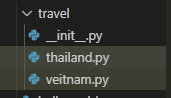
main소스
#패키지 : 모듈들을 모아놓은 집합

#방법1
import travel.thailand
trip_to = travel.thailand.ThailandPackage()
trip_to.detail()

#방법2
from travel.thailand import ThailandPackage
trip_to = ThailandPackage()
trip_to.detail()

#방법3
from travel import thailand
trip_to = thailand.ThailandPackage()
trip_to.detail()

#방법4 (__init__.py파일에 __all__사용시 가능)
from travel import *
trip_to = veitnam.VeitnamPackage()
trip_to.detail()
thailand.py
class ThailandPackage:
    def detail(self):
        print("[태국 패키지 3박 5일] 방콕, 파타야 여행 (야시장 투어) 50만원")
veitnam.py
class VeitnamPackage:
    def detail(self):
        print("[베트남 패키지 3박 5일] 다낭 여행 60만원")
__init__.py
__all__ = ["veitnam"] #리스트형태로 모듈을 넣어준다